


Volume Booster Bass Booster EQ
4.6332.00 Reviews
App Specs
- Version
- 1.3.0
- Updated On
- License
- Free
- Downloads
- 100,000+
- Developer
- Best Translate LLC
- Categories
- Medical
- Platform
- Android
Screenshots
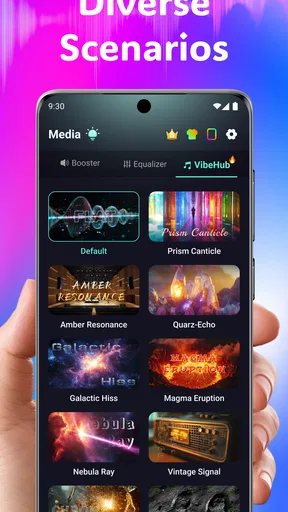
 Analysis by AppCompare
I treat any app that changes playback volume with a little caution, because louder is not automatically better. Volume Booster Bass Booster EQ is a free medical-category audio utility from Best Translate LLC, and its purpose is easy to understand: give listeners more control over volume, bass, and tone. Its 4.5 average from around 780 ratings and more than 100,000 installs suggest that plenty of people have tried it, but popularity alone is not a reason to push every slider to the limit. I would approach it as a practical adjustment tool, not a replacement for good headphones or a guarantee that every recording will sound clearer.
What I would check before turning anything up
For an audio app, trust starts with the choices I can actually see and understand. I would look at the system permission prompts during installation and use, and consider whether each requested access makes sense for the action I want to take. I would also check the app’s current privacy information and the controls available on my device before deciding what I am comfortable sharing. I would not assume that a volume control needs access to unrelated personal information, and I would pause if a prompt seems disconnected from the feature I am using.
That is a sensible habit for any utility, especially one I might open while switching between headphones, a podcast, and a video. I prefer to grant permissions only when a clear feature requires them, rather than approving prompts automatically. If a system prompt appears, I can read it first and decide whether to proceed; declining an optional permission may limit a related function, but it is better to understand that trade-off than to tap through without looking.
Keep control of the listening session
My safest way to try a booster is to begin with the phone’s normal volume at a comfortable level, then make small changes while listening to familiar audio. A track I know well makes it easier to notice whether the adjustment adds useful presence or simply makes everything harsher. I would lower the level before disconnecting headphones or moving to another audio source, since the next sound may be mixed differently and could come through much louder than expected.
This kind of tool is not equally helpful in every situation. If a speaker sounds distorted because it is damaged, or a recording itself is muffled, adding gain may make the problem more obvious rather than fix it. For a quiet spoken recording, a modest boost can help; for loud music in a noisy place, safer-fitting headphones or a quieter environment may be a better answer than chasing maximum volume. I also would not treat boosted playback as a way to overcome hearing difficulty—persistent trouble hearing is a reason to seek appropriate professional advice.
Where the app fits among audio options
Many phones already include basic sound settings, while music players may offer their own equalizers. Those built-in controls are often the simpler choice if I only want to make a small adjustment for one app or one pair of headphones. A dedicated booster is more appealing when I want volume and tone controls together in one place, but it also adds another layer to the playback chain. If sound becomes thin, boomy, or uncomfortable, I would compare the result with the phone’s default output and turn off the extra processing rather than assume more enhancement is always an improvement.
I would be particularly careful when changing between Bluetooth and wired listening, or when moving from private headphones to a phone speaker. The same setting may not suit each output, and a preset that sounds balanced on one device can become too bass-heavy on another. A quick check at low volume after each switch is a useful routine; it takes only a moment and can prevent an unpleasant surprise.
Worth Reading Before You Choose

Flipboard Shows What News Apps Must Do Beyond the Feed

Switching to Android Auto Means Rethinking Your Driving Routine

Google Calendar Makes a Crowded Week Easier to Manage

Ludo King Makes the Most of the Minutes Between Plans

Baby Panda World Brings Quick Play to Modern Phones, but Its Game Library Feels Busy

ESPN’s Live Game View Makes Following Close Games Easier
Getting Started with Volume Booster Bass Booster EQ
First things first, downloading and installing the Volume Booster Bass Booster EQ is a breeze. Available on both Android and iOS, you can find it on the Google Play Store or Apple's App Store. Once installed, the app greets you with a clean and intuitive interface. No fuss, no muss—just straightforward controls ready to pump up the jams.
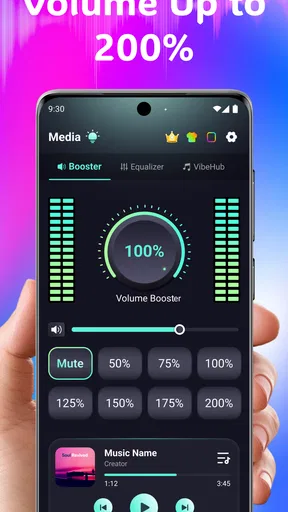
Upon launching the app, you're greeted with a simple dashboard. The main screen features a large volume knob that’s just begging to be turned. And trust me, you’ll want to give it a spin. But before we get ahead of ourselves, let's take a closer look at what this app has to offer.
Boosting the Volume
The primary function of the app is, of course, to boost your device's volume. The app developers claim you can increase your volume by up to 200%. While I can't scientifically verify that number, I can say the difference is noticeable. Whether you're watching videos, listening to music, or catching up on a podcast, the volume increase is substantial.
One thing to keep in mind is that boosting your volume too much can potentially damage your speakers or headphones. The app gives you a gentle reminder of this every time you crank it up, which is a nice touch. It's like your responsible friend who lets you know when you're being a bit too reckless at the concert.
Enhancing with Bass and EQ
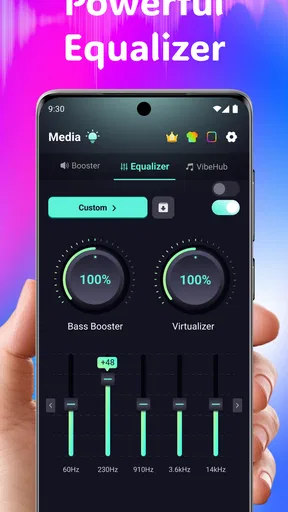
Now, let's talk about the bass. For all you bass heads out there, the Bass Boost feature is a game-changer. I tested it with some bass-heavy tracks and the difference was like night and day. The bass was deeper and richer, transforming my phone into a mini sound system.
The app also comes equipped with a 10-band equalizer. This is perfect for those of us who like to tweak and fine-tune our audio settings. You can choose from a variety of presets, such as Classical, Dance, Flat, Folk, Heavy Metal, Hip Hop, Jazz, Pop, Rock, or even create your own custom settings. It’s like having a DJ in your pocket, ready to adjust the sound to match your mood or the genre of music you're diving into.
User Experience and Design
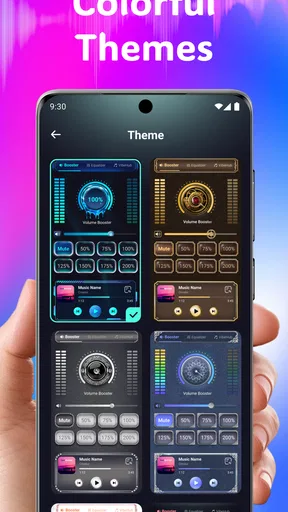
The user experience is smooth sailing. The app runs without a hitch on my device, and I didn’t encounter any annoying bugs or crashes. The design is sleek and modern, with a dark theme that's easy on the eyes. Everything is well labeled, and the controls are responsive. It feels like the developers really thought about the user's journey when creating this app.
One neat feature is the ability to create shortcuts on your home screen for quick access to your favorite settings. This means less fiddling around and more time enjoying your boosted audio. It’s a small feature, but incredibly handy when you’re in a rush or just want to keep things simple.
Final Thoughts
All in all, the Volume Booster Bass Booster EQ app delivers on its promises. It's a solid choice for anyone looking to enhance their audio experience on a mobile device. Whether you're trying to drown out the noisy commute with your favorite tracks, or just want your music to have that extra punch, this app has got you covered.
That being said, remember to use it responsibly to avoid damaging your device’s speakers. With great power comes great responsibility, right? If you're in the market for a reliable volume booster with some added bass and EQ perks, give this app a try. Your ears will thank you.
Choosing it for a real routine
Where I can imagine this app earning a place is a very ordinary moment: I’m making dinner, my phone is on the counter, and a quiet podcast gets swallowed by the sound of running water and a fan. I would try a small volume increase first, then adjust the tone only if voices still feel buried. That sequence matters. Increasing bass for spoken audio is unlikely to solve a clarity problem, while an overly bright setting can make voices tiring. I’d save a comfortable setup as a shortcut if I regularly listen in that spot, then return to a lower level when I pick up headphones.
For music, the useful workflow is different. I would start with a familiar track, choose a preset close to its style, and make one change at a time. If the low end becomes muddy, reduce bass rather than compensating by raising overall volume. If cymbals or vocals sound sharp, backing off the treble-oriented adjustment is more sensible than turning the whole output down and up repeatedly. These small comparisons help me tell whether the equalizer is improving balance or merely changing the sound for novelty.
Who benefits, and who may prefer another route
I see the strongest fit for someone who already finds their phone’s standard sound a little weak and wants straightforward volume and tone adjustments without learning a complicated audio editor. The preset approach can also suit a listener who wants to compare broad sound profiles before experimenting with a custom curve. Someone who regularly listens to different kinds of content may appreciate having a single place to revisit those choices, provided the settings behave well with their particular device and playback apps.
I would skip it if the main goal is to repair a bad speaker, make a very poor recording sound clean, or safely overpower loud surroundings. Those are problems a booster cannot reliably solve. A listener who is already happy with a music player’s built-in equalizer may be better off staying there, since fewer processing layers can mean fewer settings to manage. And if I need sound to be louder for accessibility, I would not rely on a third-party booster as the only solution; device accessibility options and qualified hearing support are more appropriate places to start.
Small checks that prevent frustrating results
One non-obvious trade-off with equalization is that boosting several bands can leave less headroom for the audio itself. The result may sound louder but also rougher, especially on a track that is already heavily compressed. When that happens, I would lower the app’s overall boost and make a narrower adjustment to the range I actually want to hear. It is usually more useful to correct one problem than to raise everything at once.
I would also test at the volume I normally use, not only at a low level while setting things up. A bass-heavy change can seem pleasant quietly but become overwhelming when turned up. Conversely, if I’m checking a preset in a noisy room, background sound can trick me into adding too much gain. A short listening check in a calmer space is a better basis for choosing a lasting setting.
Compatibility and behavior are practical questions worth answering early: does the adjustment affect the audio I actually use, and does it remain comfortable when I switch apps or output devices? I would test a short podcast, a music track, and a video before relying on the app for a commute or a long session. If the sound changes unexpectedly, I’d return to the phone’s normal output and reintroduce one adjustment at a time. That simple test can distinguish an app setting from a source-specific mix or a connection issue.
Cost, version, and a measured decision
The app is free to install and is rated for Everyone. Its current version is 1.2.5, and it was released on April 29, 2025; optional in-app purchases range from $6.99 to $69.99 per item. I would make my decision based on the free experience and the controls I actually use, rather than assuming a paid option is necessary. Before making any purchase, I’d check the in-app details and confirm that the feature is relevant to my needs and that the amount is acceptable.
On the trust side, I would keep my judgement limited to choices I can inspect: the permissions requested on my device, the privacy information available to me, and any account or purchase controls shown in the app and operating system. I would use the platform’s purchase protections and review settings rather than presume how personal data is handled. That is not a reason to avoid the app; it is simply a sensible way to evaluate any utility that I plan to keep installed.
My cautious verdict is that this is a convenient option for modest listening adjustments, especially when volume and equalization in one interface are more appealing than switching between separate controls. It is not a magic fix for hardware, source quality, or noisy environments, and restraint matters more than reaching the highest setting. If I can improve a familiar track with a small, comfortable change—and keep control of permissions and spending—it has a clear use. If I need a dependable, unprocessed sound or already have settings that work, the phone’s built-in controls may be the better choice.
Pros
- Enhances audio clarity and depth effectively.
- User-friendly interface with intuitive controls.
- Customizable equalizer settings for personal taste.
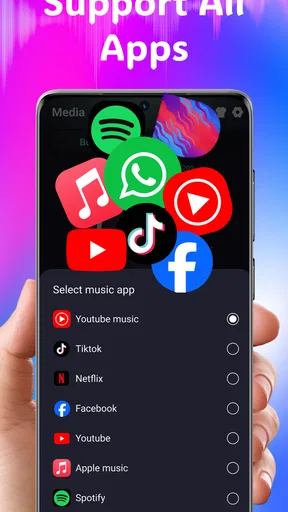
- Compatible with most music and video apps.
- No noticeable impact on battery life.
Cons
- Ads can be intrusive at times.
- Limited free features without upgrades.
- Not all devices support full functionality.
- May distort sound at very high volumes.
- Requires access to device settings.
FAQs for Volume Booster Bass Booster EQ
What features does Volume Booster Bass Booster EQ offer?
Volume Booster Bass Booster EQ provides users with an advanced equalizer, bass boost options, and a volume amplifier to enhance audio experiences. It is designed to increase the volume of your device beyond its standard limits while maintaining audio clarity. Additionally, it offers customizable presets and a user-friendly interface for easy navigation.
Is Volume Booster Bass Booster EQ safe to use?
Yes, Volume Booster Bass Booster EQ is safe to use; however, it's important to use the application responsibly. Excessive volume levels can damage your hearing or speakers. The app includes safety warnings and guidelines to help users avoid potential risks associated with high volume levels.
Does Volume Booster Bass Booster EQ work with all types of media?
Volume Booster Bass Booster EQ is compatible with most media players and streaming services on Android and iOS devices. It can enhance audio from music apps, video players, games, and even system sounds. However, some apps with internal sound management might not fully support external equalizer functions.
Will using Volume Booster Bass Booster EQ drain my battery faster?
While Volume Booster Bass Booster EQ is optimized for efficient performance, using it with high settings and for extended periods might consume more battery. The app processes audio in real-time, which can demand additional power from the device, so it's advisable to monitor battery usage during extended sessions.
Can I customize sound settings in Volume Booster Bass Booster EQ?
Yes, the app allows extensive customization of sound settings. Users can create and save personalized equalizer presets, adjust bass levels, and tweak volume settings to suit specific preferences or environments. The intuitive interface makes it easy to navigate and experiment with different audio configurations.


